(Click on a question to see the answer)
- How do I protect my computer from electrical surges or brownouts?
For desktop computers we recommend they be connected to a UPS (Uninterruptible Power Supply). The UPS provides surge protection, power conditioning, and contains a battery to keep your computer running through a brownout or for a short period of time in the event of a loss of power at your home or business. They can be connected to your computer via USB and if power is lost they can automatically shutdown your computer.
For laptops we recommend a surge suppressor to protect your battery charger and battery from surge and unconditioned power.
- How much Memory (RAM) should my computer have?
We recommend purchasing a system with a minimum of 8GB of RAM. Gamers’ and users working extensively with video or photo programs should consider additional RAM (16GB to 32GB).
- What is the best upgrade to speed-up my existing computer?
Our favorite upgrade is to replace your computer’s existing mechanical hard drive with a solid state drive (SSD). This will significantly speed up most computers. We help you select the right sized SSD for your needs, clone the contents of your existing system to the new SSD and then swap it into your system.
Contact Us if you’d like to know more about upgrading to an SSD.
- Do computers need to be cleaned?
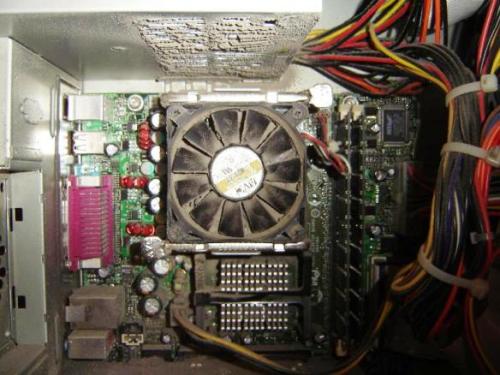
We recommend that you periodically vacuum the exterior of your computer. This will help prevent internal dust build-up which can lead to problems with performance. Prior to vacuuming the exterior you should turn the computer off.
If your current computer (desktop or laptop) has gotten slow it may be time for a cleaning.
“Computers are like vacuum cleaners without the bag,” the fans draw in dust and dirt along with cooler air. This dust and dirt coats the inside of the computer which makes the computer run hotter which can lead to component failures.
We can clean the interior of your desktop or laptop and remove the dust build-up which will help to prevent your components from failing due to heat build-up.
- Where do you recommend we purchase computer equipment?
Our preference is to buy locally from Micro Center in Fairfax, VA. That way if there is an issue with a new computer or part it can be quickly replaced. Online we use Amazon.com and Newegg.com.
- What type of processor should I look for in a new computer?
We recommend you purchase a desktop, laptop or all-in-one that has a 11th or 12th Generation Intel® Core™ i5, i7, or i9 Processor.